 DeniseUI
Pixels straight to the panel.
DeniseUI is a direct-rendering UI toolkit for kiosks, digital signage, industrial HMIs, Raspberry Pi panels and in-vehicle displays. No X11. No Wayland. No browser engine. No managed runtime. One static binary that opens the display, draws, and reads input.
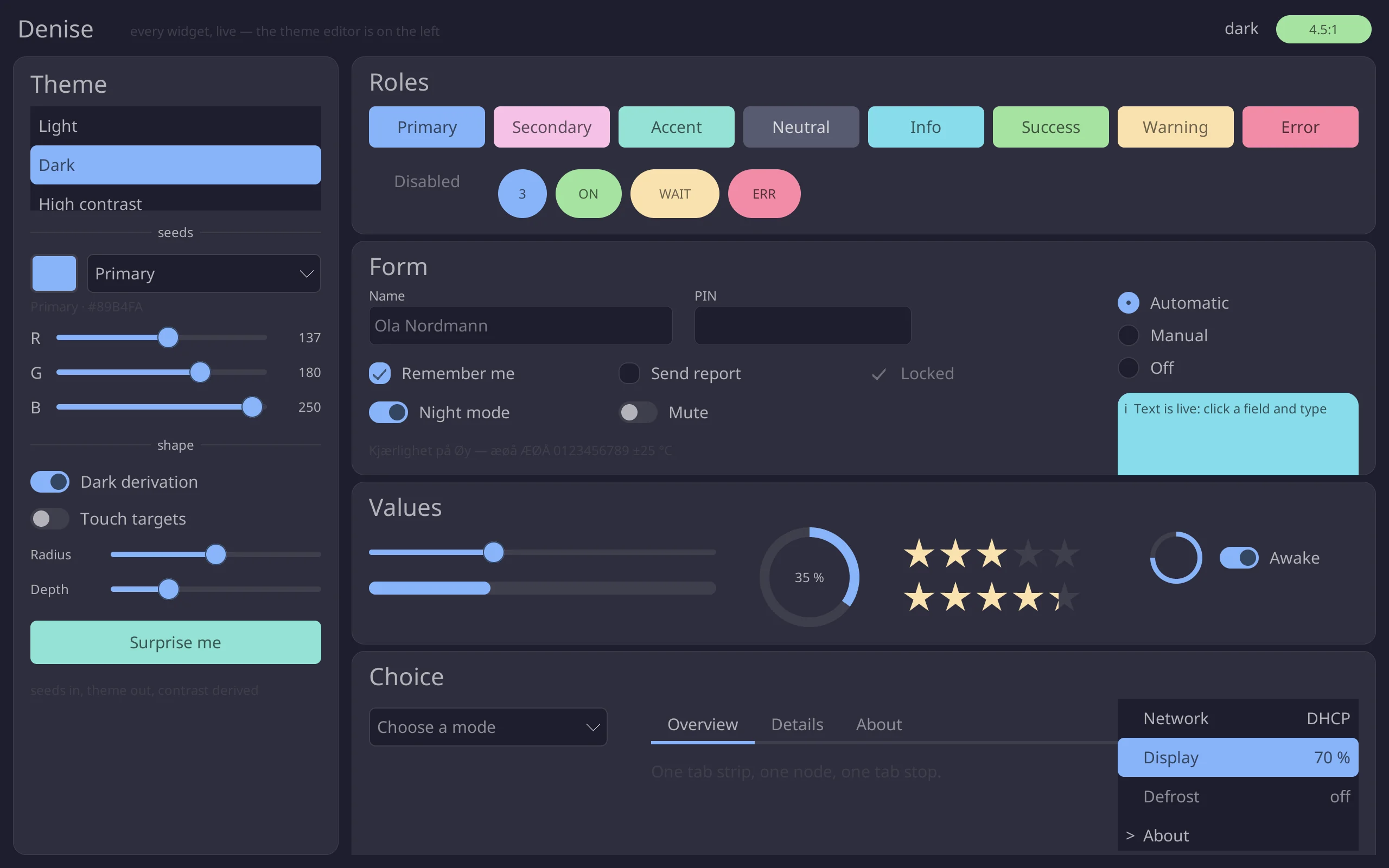
Really running: the widget gallery, compiled to WebAssembly. Click it, type in it, drag a slider.
A panel shows one application. Why boot a desktop for it?
The usual way to put a screen on an embedded Linux board is to bring up a whole desktop session and then hide it: a compositor, a window manager, a GPU stack, often a browser engine, all to draw one form that never moves. DeniseUI deletes that. Your application links the toolkit, opens the display device itself and draws into the scanout buffer.
- Boots to your screen in one process, with no session to keep alive
- Nothing between a changed pixel and the page flip
- A far smaller thing to keep patched for ten years in the field
- The same binary builds for a window while you develop
The binary opens /dev/dri (or /dev/fb0), reads /dev/input, and draws. Nothing to boot into, nothing to keep patched, nothing between a changed pixel and the page flip.
Widgets do not run callbacks
A button holds a value of your type and emits it when pressed, so every state change happens in one match you wrote rather than in a closure somewhere else.
There are no dirty flags, no repaint bookkeeping and nothing to invalidate. The way you use it is by not doing anything.
The whole runnable version is examples/hello: eighty lines, half of them comments. The same screen can be a file instead, drawn in the designer and loaded at run time.
use denise::{Rect, Role, Size, theme};
use denise_ui::widgets::{Button, Label, TextInput};
use denise_ui::Ui;

#[derive(Clone, Copy, PartialEq, Eq)]
enum Message {
    Greet,
}

let mut ui: Ui<Message> = Ui::new(Size::new(460, 260), theme::DARK);
let root = ui.root();

ui.add(root, Label::new("What is your name?"), Rect::new(20, 20, 388, 20));
let name = ui.add(root, TextInput::<Message>::new(), Rect::new(20, 44, 388, 34)).unwrap();
ui.add(
    root,
    Button::new("Greet", Message::Greet).with_role(Role::Primary),
    Rect::new(20, 90, 110, 34),
);
A tree of widgets, positioned with rectangles. No callbacks: a button holds a value of your type.
Built for machines that run for a year
Every one of these is in the repository today, measured on real hardware rather than asserted.
Damage tracking, not dirty flags
Type into a field and the field repaints. There are no invalidate() calls, no repaint bookkeeping and nothing for you to remember: the tree knows what changed and paints only that.
Straight to the display
DRM/KMS with async page flips and a hardware cursor plane, or fbdev where there is no /dev/dri. Input comes from evdev, the console is muted, and it is handed back on exit.
A no_std core
denise, denise-render, denise-text and denise-ui all build no_std + alloc, with zero allocation in the render hot path. CI asserts the core’s dependency tree contains no platform crates.
forbid(unsafe_code) in the core
unsafe lives in backend crates only, every block with a SAFETY comment. CI runs cargo deny, Miri over the C ABI, and fuzzes the image decoders and the ABI.
Themes from nine seeds
Widgets name roles, never colours. A theme is derived from nine seed colours with contrast aimed at WCAG AA by construction, and swapping one is a single call.
Text in three tiers
The built-in 8×8 bitmap font costs nothing, TrueType through ab_glyph adds about 65 KB, and full shaping through cosmic-text adds 3.1 MB. You pay for what you draw.
A keyboard for panels with none
denise-keyboard emits exactly what evdev would, in the layout the machine is configured for — US, Norwegian or German — with dead keys and long-press alternates.
Embeddable in what you already ship
A stable C ABI, an NSView on macOS, a child HWND on Windows, and a registered, scriptable ActiveX control for the hosts that still want one.
What it costs when nothing happens
The number that matters for a panel left on for a year. On a Raspberry Pi 3 A+ at 1920×1080, the panel demo left untouched for ten seconds — with a text field focused, so its caret is blinking — draws twenty frames, wakes twenty times, and spends eighty milliseconds of CPU in total.
Move the pointer and it repaints two cursor-sized rectangles, not a megapixel. Set Motion::None and animations land at once and the tree asks for no wake at all — which is both the reduced-motion answer and the tightest power budget.
Most of those 80 ms are the two full repaints every double-buffered swapchain owes at start-up. The loop blocks in poll on the input descriptors and the caret deadline; with nothing focused there is no deadline, and it blocks indefinitely.
Twenty-eight widgets, and the tree owns the hard parts
Tooltips, toasts, drawers, modal scenes, popups, scrolling, focus order and the on-screen keyboard belong to the tree, so a widget stays a small thing that draws and answers events.
A form designer, like 1995 promised
Drag widgets out of a palette, snap them to guides, edit every property in the inspector, and press F5 to run the form. The canvas draws with the same code that will draw it on the panel, so what you see is what ships, to the pixel.
It writes a .dform file: text, readable in a diff, hand-editable, comments preserved — and every edit undoes byte for byte, because the file is the document.
A Raspberry Pi with no desktop at all
The third machine has no window system, so there is nothing to screenshot. These are photographs of a Pi 3 A+ driving a 1920×1080 display over DRM/KMS: same binaries, rebuilt with --no-default-features --features kiosk, which is the only thing that changes.
The moiré is the camera against the panel, not the renderer. The keyboard reads the layout off the board: this one is configured Norwegian, so the home row ends ø æ.
Where it runs
The application picks its backend at compile time, with a cargo feature. The toolkit does not choose and offers no way to: aarch64-unknown-linux-gnu is the same target on a kiosk Pi and on a Pi running the desktop image, so a probe in a library would be wrong half the time.
A kiosk build therefore never compiles winit at all.
| Target | Crate | Status |
|---|---|---|
Bare Linux, DRM/KMS Pi 3 A+ at 1920×1080, async page flips, hardware cursor plane, console restored on exit | denise-drm | ready |
Bare Linux, fbdev The fallback when there is no /dev/dri | denise-fbdev | ready |
macOS, Windows, Linux desktops Development and preview, one tree per window | denise-winit | ready |
Desktop, on the GPU A painter on wgpu, parity-tested against the rasteriser | denise-wgpu | building |
Inside a macOS app An NSView over a CoreGraphics bitmap context | denise-macos | ready |
Inside a Windows app A child HWND over a DIB section | denise-win32 | ready |
COM and ActiveX hosts Registered, sited, scriptable, with a type library | denise-activex | ready |
Anything with a C FFI A stable C ABI and a hand-written header | denise-ffi | ready |
Nineteen crates, one version number
Take the core and a backend; leave the rest. Each crate has its own README — its API, its platform notes, and what it deliberately does not do — and every Rust example in them is compiled by cargo test --doc, so they cannot drift.
Core types, the surface and painting traits, damage tracking, theming
Software rasteriser and the built-in font
Glyph sources, atlas, line layout, word wrapping
Scene graph, scene stack, widgets, cursor sprite
Optional content-driven layout: rows, columns and layers over the tree
The same painting trait on wgpu, for the desktop
PNG, JPEG, GIF and BMP decoding into premultiplied pixels
Keyboard layouts, dead keys, the system’s configured layout
Loads a .dform file into a widget tree at run time
On-screen keyboard: a shelf of keys that emits what hardware emits
V4L2 hardware decode onto a DRM plane, zero-copy
Linux DRM/KMS, the primary target
Linux fbdev fallback
Input devices, console muting
Desktop development and preview
Embeddable NSView
Child-HWND control
COM/ActiveX shim, scriptable
Stable C ABI, cdylib
cargo add denise@0.31 denise-ui@0.31 denise-winit@0.31 Draw your first frame
Clone the repository and run the gallery in a window. When it looks right, rebuild it for the display itself and put it on a board.
git clone https://github.com/bisand/denise cargo run -p gallery cargo run -p gallery --no-default-features --features kiosk